How to Find a Hidden Water Leak Under a Sink: A Simple, Safe Check
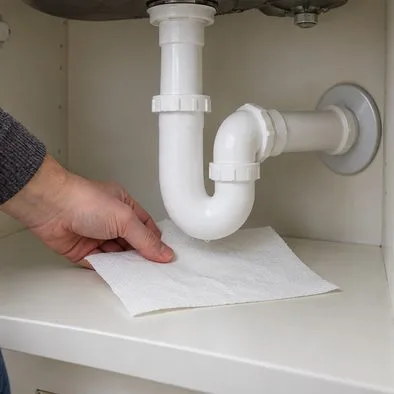
Use dry paper towels and four focused checks to find a hidden sink leak, tell supply leaks from drain leaks, and know when to call a plumber.
If a ceiling fan starts to wobble, switch it off if the movement is pronounced, getting worse, or accompanied by knocking, scraping, loose parts, or electrical warning signs. A small, steady movement can come from blade imbalance or alignment, but movement at the ceiling mount may mean the fan is not securely supported. Do not keep running a fan that appears loose at the ceiling.
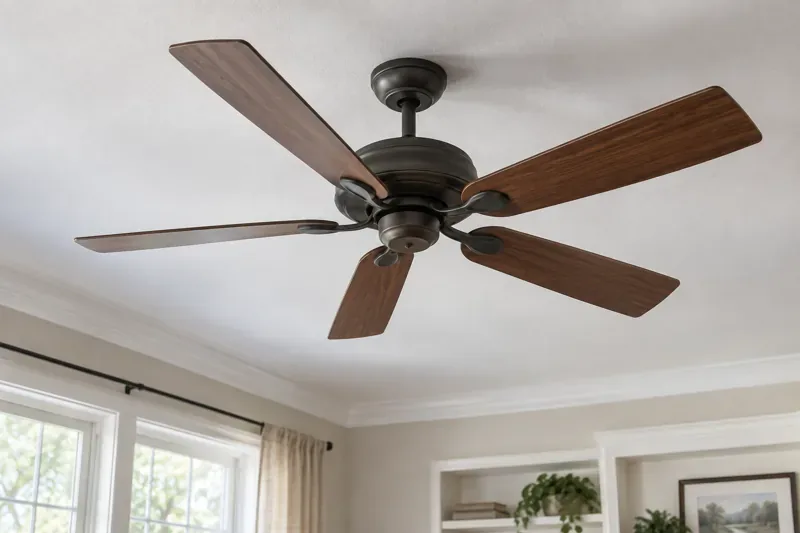
Many wobble problems are repairable, but the right response depends on where the movement starts. You can make a basic visual check from the floor after turning the fan off. If the mounting hardware, electrical box, or wiring may be involved, leave the repair to a qualified electrician or follow the fan maker’s service guidance.
Turn the fan off promptly if it shakes noticeably, swings farther as speed rises, makes repeated clunks or scraping sounds, or has a blade or blade holder that looks cracked, bent, or loose. Also stop using it if the canopy or mounting bracket shifts against the ceiling, the ceiling itself moves or cracks near the fan, or any part seems to be separating. These signs call for inspection before the fan runs again.
Switch it off and arrange prompt electrical help if you notice a burning or hot-plastic smell, smoke, sparks, a buzzing sound from the ceiling or switch, or a breaker that trips repeatedly. Do not touch the fan or open the canopy to investigate while power is on. If there is smoke or fire, move away and contact local emergency services. For a suspected electrical fault without an active fire, use the wall control only if it is safe to do so; switch off the circuit breaker if you can identify it safely, then contact an electrician.
By contrast, a slight, unchanged visual movement with no noise, damage, or movement at the ceiling plate is less urgent than a fan that lurches or rattles. It still deserves a check: there is no universal wobble measurement that determines safety for every model and mounting setup. Follow the owner’s manual and take new or increasing wobble seriously.
Fan blades can differ slightly in weight, angle, or position. A blade may also become bent, warped, or misaligned, or a blade arm may sit at a different angle from the others. As the fan spins, these differences can create an uneven pull that looks like the whole fan is swaying. Dust buildup on one blade or a replacement blade that does not match the model can contribute to imbalance as well.
Loose screws where the blades attach to their holders, or where the holders attach to the motor, can let the blades sit unevenly. The downrod connection, set screw, ceiling plate, and other mounting fasteners can also loosen or be assembled incorrectly. A new fan that wobbles from its first use may have an installation or alignment issue; a fan that develops wobble later may have loosened hardware, damage, or a blade that has shifted.
A ceiling fan needs a fan-rated electrical box and mounting arrangement secured to appropriate structural support. A light-fixture box that was not designed for a fan may not support its weight and vibration. ENERGY STAR advises using an appropriately rated box and anchoring the fan to a ceiling joist or a proper fan brace. If the entire mount moves, balancing weights are not the answer: stop using the fan and have the support checked. Installing or replacing a fan-rated box involves electrical and structural work, so use a qualified electrician when you are unsure.
A blade that comes too close to a wall, beam, ceiling slope, or another object can be disturbed or strike something. An incompatible light kit, blade set, downrod, or control may also affect operation. Check the clearance and accessory compatibility in the specific fan’s manual rather than relying on a measurement from a different brand or model.
First, turn the fan off and wait until every blade has stopped. From the floor, look for a visibly damaged blade, missing screw, accumulated dust, a dangling part, or a canopy that is no longer flush with the ceiling. Do not reach toward moving blades, climb on furniture, or push on the fan to test whether it is secure.
If nothing appears damaged and the fan’s mount does not move, consult the model’s manual. With the fan fully stopped, you may clean the blades gently and check accessible blade fasteners only as the manufacturer directs. If any screw needs tightening, follow the manual and use the correct tool; do not force a screw or bend a blade or blade holder unless the manufacturer specifically instructs you to do so. For any work near wiring, the motor housing, or the ceiling box, turn off power at the breaker and follow the manual. If you cannot verify that the fan is safely de-energized, stop and call an electrician.
When the fan is securely mounted and the remaining problem appears to be blade balance, use only a balancing kit suitable for that fan and follow its instructions. Some kits use a temporary clip to identify a blade and small weights to correct a minor imbalance. Keep people clear while testing. If the wobble remains, gets worse, or requires repeated improvised adjustments, stop and contact the manufacturer or a professional instead of adding random weights.
The distinction that matters most is whether the blades alone appear out of balance or the fan’s support is moving. Blade balance may be corrected with the model’s instructions and a proper kit. A moving mount, damaged parts, or electrical symptoms call for the fan to remain off until the underlying problem is addressed.
ENERGY STAR: Ceiling Fan Installation and Usage Tips explains fan-rated electrical boxes, structural mounting, and balancing checks. Hunter Fan Support: Why Is My Fan Wobbling? lists clearance, mounting hardware, and model balancing instructions. For support-box installation and power isolation, see Hunter Fan Support: What Is a Ceiling Fan-Rated Electrical Box? Manufacturer instructions can differ, so use the manual for your exact fan.
Use dry paper towels and four focused checks to find a hidden sink leak, tell supply leaks from drain leaks, and know when to call a plumber.
Bathroom mirror streaks often come from residue, dirty cloths, excess cleaner, or dried water. Find the likely cause and a gentle way to fix it.
Reduce overnight window condensation by controlling indoor moisture, improving airflow, monitoring humidity, and knowing when the window itself needs attention.
Reduce cooking and kitchen odors without fragrance by improving ventilation, cleaning grease and food residue, managing waste, and finding persistent odor sources.
Learn why ceiling fans wobble, which warning signs mean turn it off, and what you can safely check before calling an electrician.
Learn why indoor plant leaves turn brown at the edges, how to read clues about watering, humidity, salts, and light, and when to seek expert help.
Keep stored clothes dry without mothballs: measure closet humidity, reduce moisture at the source, dry garments fully, choose suitable storage, and inspect for mold.
Musty towels often point to lingering moisture, washer residue, or slow drying. Learn how a hypothetical laundry example helps narrow the cause and what to change first.
Keep balcony plants hydrated during a short trip with a plan based on pot size, plant needs, sun, and wind. Compare wicks, self-watering pots, and plant sitters.
Move a heavy houseplant safely without scratching hardwood, denting flooring, spilling soil, or straining your back. Use a protected path, a dolly, and a controlled team lift.